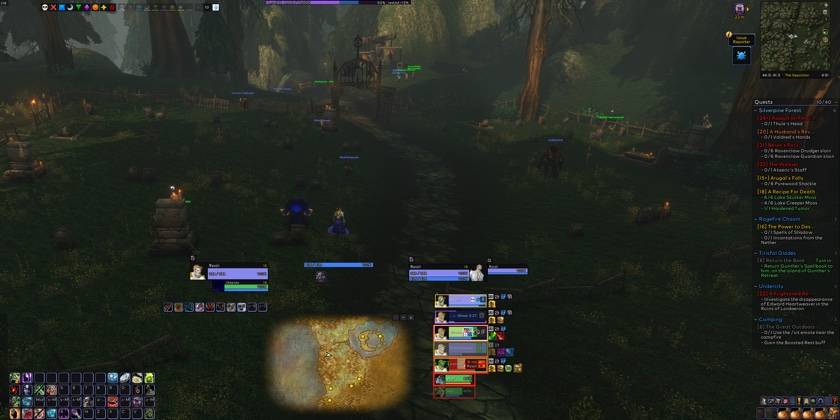
Built from a few rules几条做事的规矩
- One flat, square look, in three looks you can switch.一个扁平方正的风格,三种外观可以切换。
- One icon for every aura: buffs, debuffs, heals over time and shields look the same; the border colour tells the type.所有光环一个图标:增益、减益、持续治疗和护盾长得一样,边框颜色表示类型。
- Only what matters, always in the same place.只显示要紧的,位置永远不变。
- Every part has its own switch: turn it off and Blizzard's frame comes back.每个部分都能单独开关:关掉,暴雪原来的框体就回来。
- Every settings page has a test mode: set things up without a group or a dungeon.每个设置页都有测试模式:不用组队、不用进副本就能调。
What is inside里面有什么
Cooldown manager冷却管理器
Your own panels of icons that watch spells, buffs, debuffs, items and totems, with looks, sounds and class-coloured outlines.自己搭的图标面板,监视技能冷却、buff、debuff、物品和图腾,有各种样子、声音和职业色外框。
Open打开Unit frames单位框体
Player, target, focus, pet and boss frames, nameplates, combat text, auras, resource bar, cast bar and swing timer.玩家、目标、焦点、宠物和首领框体,姓名板,伤害数字,光环,资源条,施法条和攻击计时。
Open打开Party and raid小队和团队
Party and raid frames, click casting, the readiness and buff check, raid leader tools and PvP.小队和团队框体,点击施法,准备检查和增益检查,团长工具和 PvP。
Open打开Interface界面
Action bars, menu and bags, XP and reputation, cooldowns, damage meter, bags and bank, loot, chat, quests, leveling dungeons, tooltips, maps, training and the talent planner.动作条,菜单和背包栏,经验和声望,冷却,伤害统计,背包和银行,拾取,聊天,任务,练级副本,鼠标提示,地图,技能训练和天赋模拟。
Open打开Setup配置
Convenience options, profiles with export and import, the feedback page and the performance page.便利选项,带导入导出的配置档,反馈页和插件表现页。
Open打开Latest changes最近更新
2.22.0 2026-10-21
- Chat copy window ("this window" page): a search box shows only the lines that contain the typed word. (#1747)
- Chat setting "Scrollback lines" (128 / 256 / 500 / 1000, default 256): every chat window keeps that many…
- Chat: pointing at an item, spell, quest or achievement link in a chat window shows its tooltip (Settings…
- 聊天复制窗口(“这个窗口”页):加了搜索框,只显示含输入词的行。(#1747)
- 聊天设置“回滚行数”(128 / 256 / 500 / 1000,默认 256):每个聊天窗口按这个数保留可以往上滚的行数(暴雪自己只保留 128 行),新开的窗口也跟,复制窗口选 200 行现在真的是 200…
- 聊天:鼠标指到聊天里的装备、法术、任务、成就链接时显示提示(设置 → 聊天 → 聊天链接,默认打开)。(#1745)
2.21.0 2026-10-21
- The bag window's category view now has separate sections for trade goods, gems, recipes, containers…
- Tooltips: spell, buff/debuff, item, toy, currency, quest and achievement tooltips end with a grey line…
- Bag window bar: a row of small bag icons (backpack, equipped bags, reagent bag) along the bottom of the bag…
- 背包的“按物品分类”视图把工艺材料、宝石、配方、容器、收藏品(坐骑、宠物、玩具)和钥匙各分成单独的分区,排在“材料”之后、“其他”之前;自定义分类的规则类型里也能选这些新类型,示例物品预览会显示每一个分区。…
- 鼠标提示:法术、增益/减益、物品、玩具、货币、任务和成就的提示末尾多一行灰色的编号(法术 ID、物品 ID 等);鼠标提示设置页里可以关,默认开。(#1696)
- 背包窗口底部的背包栏…
2.20.1 2026-10-20
- The P5UI Aura Cooldown Manager is no longer a beta: the menu entry, its title, the switch and the notes no…
- P5UI Aura 冷却管理器不再是测试版:菜单名、标题、开关和说明里都不再写“测试版”(菜单叫“冷却管理器”,仍是第一项)。(#1695)
Getting started上手
/p5ui opens the settings. /p5ui wizard runs the one-minute setup tour. /p5ui unlock moves frames. /p5ui test, /p5ui raidtest and /p5ui bosstest show test frames.
输入 /p5ui 打开设置,/p5ui wizard 运行一分钟向导,/p5ui unlock 移动框体,/p5ui test、/p5ui raidtest、/p5ui bosstest 显示测试框体。
Help and feedback问题和建议
Found a bug or want a feature? The feedback page needs no account and screenshots can be pasted in. In game, /p5ui report gathers what a bug report needs.
发现问题或想要新功能?到反馈网页提交,不用账号,截图可以直接粘贴。游戏里输入 /p5ui report 会收集问题报告需要的全部信息。
Support P5UI支持 P5UI
Building and maintaining a complete UI takes a lot of time: every feature is tested again with each new Forever build, and reported bugs get fixed as fast as possible. If you enjoy using P5UI, please consider supporting it. P5UI is free and always will be: every feature is for everyone, whether you donate or not.
做一整套界面插件不容易:每个功能都要跟着 Forever 的每次更新重新测一遍,大家报的错也要尽快修。如果你喜欢用 P5UI,欢迎支持一下。P5UI 现在免费,以后也永远免费,所有功能人人都能用,赞不赞助都一样。
- Venmo (United States): scan the code, or donate on Venmo
- PayPal (worldwide): scan the code, or donate with PayPal
- Alipay (China): scan the code with the Alipay app
- Interac e-Transfer (Canada):
cweihc@gmail.com
- Venmo(美国):扫码,或在 Venmo 上支持
- PayPal(全球):扫码,或用 PayPal 支持
- 支付宝(中国):打开支付宝扫一扫
- Interac e-Transfer(加拿大):
cweihc@gmail.com